Targuman Rotating Header Image

iPhone

Shared stories

Just a reminder that if you want to also follow what I share via Google Reader you may: http://www.google.com/reader/shared/prof.brady

You do not need to use Google Reader, by the way, to see my shared items or even to use the GR features. Or at least you don’t need to use GR directly. I useNewsRack on my iPad and iPhone which connects and syncs to my GR account. It allows me to Share, Like, and so on from within the app.


A scholarly reading list

I was put on to this by The Unofficial Apple Weblog and will quote most of the story below. The gist is that National Association of Scholars felt that many of the books recommended for summer reading by colleges and universities just weren’t up to snuff. The result is their own reading list, one that they felt was more suitable: Read These Instead: Better Books for Next Year’s Beaches. TUAW’s contribution was to provide links to those available in free ePub format, many I have read, but others have been on my to-read list for quite some time.

Many of these titles are freely downloadable in ePub format and can be synced to iBooks for your portable reading pleasure. Here’s a quick run-down of some of the recommended books, along with quick links to iBooks-compatible downloads.


iPad, iPhone 4 apps and accessories

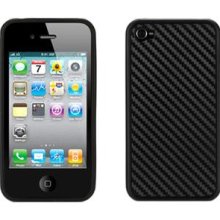
I have had my iPad for a few months now and my iPhone 4 for a few weeks so I thought I would share a few tips, apps, and accessories that I have found useful.1 First for the iPad.

Cases
I started out with Apple iPad Case which I found to be very nice. It is a soft microfiber that is completely form fitting, which is very nice since it does not add any substantial bulk to the device. The best part, and what was initially lacking in all other leather case offerings, is the ability to prop the iPad at an angle perfect for typing. Eventually I discovered the Marware Eco-Vue for iPad. At the moment you can get it for $4 less than the $39 Apple case. The Mareware is a beautiful leather case that has a prop for the ideal typing angle I mentioned a moment ago, a hand strap in the back for those times you are wandering around holding the iPad (perhaps in an industrial or hospital setting? perhaps library?), and an elastic strap to close it, similar to a Moleskin notebook. The interior is a very nice gray suede. My top pick for an iPad case.

Apps
In an early post about using the iPad on the road I mentioned the excellent BibleReader and iAnnotatePDF. Both apps have gone from strength to strength. I would add to your must have list DropBox. If you do not have this, you should get it now. DropBox is a cloud storage service that will give you a free 2GB account and software for your Windows or Mac desktop and all your mobile devices, including iOS, Android, and soon BlackBerry. The iPad app is fantastic, allowing you to view your files and, where it is an appropriate file type, open them in another iPad app for the purpose of editing or viewing such as Pages or iAnnotatePDF or GoodReader. We are still lacking a good “round trip” solution that allows you to download, edit, and upload a file, but DropBox is close and their programmers tell me they are working on it very diligently.

A few other apps I recommend are the Guardian Eyewitness, a daily update of their best news photo with pro tips, NPR news app, IMDb for movies, and AirVideo (recommended by my brother) which allows you to stream movies from your computers hard-drive to your iOS device from anywhere! Not bad for $2.99. The other apps are free.

iPhone 4
(more…)

 
  1. I periodically share about what electronic products I use, just as I do books I am reading. I often link to the products on Amazon. In the interest of full discloser (but most of you no doubt already realize this), I do receive a small amount if you buy something at Amazon having followed one of those links. I greatly appreciate and it does help to fuel this blogging habit of mine. Many thanks! []

CHE Wired – Attendance for iOS and Admissions Tweets

Today’s Chronicle of Higher Education Wired newsletter has two stories that were of interest to me and may be for you all as well. The first is a very handy app, Attendance.

One of the only explicitly teaching-related iOS apps that I use is Attendance, a straightforward program by David Reed, a computer science professor at Capital University. I reviewed the app forMacworld.com upon its first release, and have used it religiously over the intervening 18 months.

Attendance has such a straightforward purpose that, frankly, I haven’t paid much attention to the features added in recent updates. It turns out that Attendance is a universal app, in that it runs on iPhones, iPod Touches, and the iPad.

This seems a simple and elegant solution that includes nods to real world concerns, such as being able to add pictures of your students so you can actually remember who they are.

The second is a story about schools attempting to use Twitter as a recruitment tool. While admissions offices are moving to Twitter as a means of recruiting students they are finding that HS students are not even on the social networking site.

Colleges are ramping up efforts to connect with prospective students through Twitter—but students aren’t interested, a new study says.

Evidence has shown that teenagers rely on college visits and Web sites to learn about colleges, rather than social-media outlets. When it comes to Twitter, students are barely on the site at all, let alone for college research purposes.

I am sure many of us could have told them that. In fact, the director of marketing quoted noted that while HS students aren’t interested in Twitter they admissions workers are all late 20s to mid-30s, the Twitter demographic. But I think it is wrong to move away from social media. The real power of these tools is the ability to make them work together. My shcdean Twitter account is connected to my Facebook status and my SHC blog. When I update one the others are all updated and I know that the others are being read. So, one “push of the button,” so to speak, and I hit all the major outlets. The trick then, as always, is to use the tools intelligently, not just follow the trends.


A “walled garden” or a grocery store?

Walled Garden

Walled Garden by recursion_see_recursion on flickr, used under Creative Commons license.

There is much debate about whether Apple’s ecosystem (iTunes/App Store/iPhone/iPad) is an attempt to control your life or simply offer you a good consumer experience. The Unofficial Apple Weblog has a link to a post and commentary suggesting that the iPad and the whole Apple system is akin to AOL. You remember AOL, the old AOL I mean, who offered you all the internet without any of the muss and fuss. Of course that AOL died out once folks realized they could use Netscape for themselves.

John Battelle’s post cited by TUAW is titled, “Is The iPad A Disappointment? Depends When You Sold Your AOL Stock.” He argues that the iPad will fail

in the long term, in particular if Apple doesn’t change its tune on how the iPad interacts with the web.

He then goes on to say that the iPad does not really interact with the web, or at least apps cannot link to the web. And this, he argues will be the downfall of the iPad. Except I can get access to anything (non-Flash, granted)1 on the web through my iPad. OK maybe a programmer can’t always get at what she wants directly within the app, but many apps I use (newsreaders, twitter, BBC) link out to the web via Safari. So I think that this prediction of John’s like his earlier prediction that the iPad would fail, is likely to be wrong.

TUAW, however, phrases the question differently and made me think of a different metaphor.

AOL was a “walled garden” of their content, and as long as Apple maintains its grip on the App Store, it’s that same garden; each app works within its own flower pot, almost completely independent of the others.

I have often heard people, as alluded to in my introduction, say that they object to Apple controlling so tightly what can go into their app store. Last night Steve Jobs apparently referred to this as the “curated” approach where 95% of the apps are approved, so long as they don’t crash and use the public API. Those less generous say that it is a walled off place, hidden and protected, BUT what we really want and need is open and freely available software. Now I won’t get into the religious wars of open source software. Instead I offer a different metaphor, that of an old fashioned store.

The App Store is not so much a garden as a grocery store or, to be more direct, computer store, with items clearly labeled, boxed, and vetted. Remember when you used to have to buy software in a box, with floppies and maybe even a manual? One of the benefits of that system was that you knew where the software was coming from, you had some assurance that this copy of Fox Pro was actually made by Fox Software and was not, in fact, a trojan horse designed to bring your system down.

Some may say that I am being an Apple apologeticist, it has happened in the past, but this seems to me the best of both worlds. I can download my software without having to go to a brick store, but I have some assurance that what I am getting is legitimate and will not harm my machine. Yes, it is a controlled environment, but as with food, medicine, and motor vehicles I think quality control is a positive, not a negative.

 
  1. In my day to day use I rarely find myself saying, “Darn! If only I could access this Flash content on my iPad.” I just don’t miss it. []