iPad UPDATE:
I now have my iPad and as suspected there is no Hebrew support. I can’t imagine that this would be omitted for long, given that it is already in the iPhone OS, but it is odd. Perhaps the larger keyboard layout of some of these languages was a problem? Or more likely, as someone else suggested, right-to-left support is already weak in Pages, perhaps they did not want to highlight that fact.
And Steve Jobs did not reply to my email on the subject.
UPDATE:
In checking to see what sort of PDF support the iPad would have (I want to be able to annotate as I can in Preview and Adobe Acrobat) I came across an obvious bit of data at Apple’s Tech Spec page for the iPad. This is not good news and curious, given the Hebrew support already present in the iPhone OS. I wonder if this is just an omission in the notes.
Languages
- Language support for English, French, German, Japanese, Dutch, Italian, Spanish, Simplified Chinese, Russian
- Keyboard support for English (U.S.) English (UK), French (France, Canada), German, Japanese (QWERTY), Dutch, Flemish, Spanish, Italian, Simplified Chinese (Handwriting and Pinyin), Russian
- Dictionary support for English (U.S.), English (UK), French, French (Canadian), French (Swiss), German, Japanese, Dutch, Flemish, Spanish, Italian, Simplified Chinese (Handwriting and Pinyin), Russian
In my previous post about the iPad I said that one of only two things I can see lacking (for my use) in the iPad was the ability to input Hebrew. I said at the time that I thought it must be possible since there are programs on the iPhone that allow it, but I had not explored it deeply. Sure enough! It is there and Steve Caruso of The Aramaic Blog was kind enough to enlighten me.
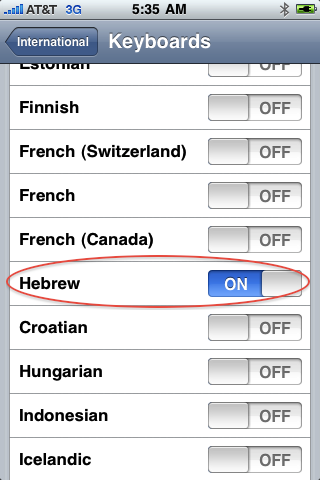
There already exists a Hebrew keyboard for the iPhone, you just need to activate it in the System panel.
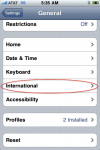
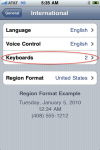
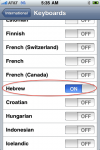
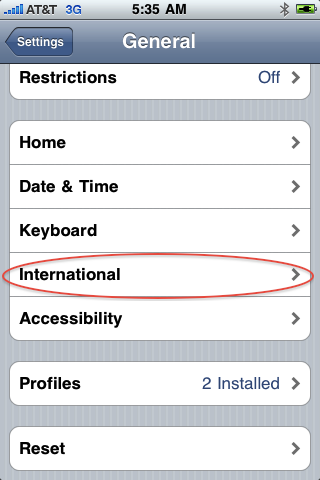
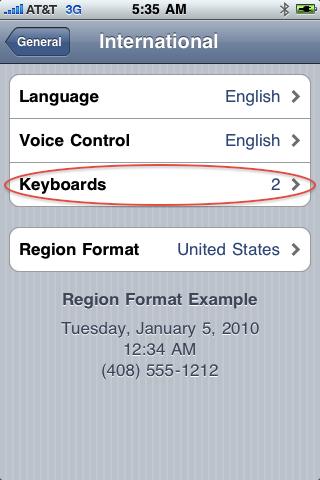
Settings -> General -> Keyboard -> International Keyboards
And Hebrew’s about half way down the list. To swap between keyboards, you’ll notice a new key appear to the left of the space bar that looks like a little globe. Give that a tap and you’ll cycle through the ones you have active.
It’s been especially handy to use, and I’ve re-written parts of my translation delivery system to take full advantage of it.
Now if they could only get Syriac on it.
Peace,
-Steve

And a couple of screen shots to show the way (I just realized that I used a slightly different path than Steve describes, but I am too lazy to do the screen grabs again, but you get the idea):






14 thoughts on “Hebrew on the iPhone and iPad”
This is not good.
I would like to get an iPad but I need Hebrew support.
Maybe it has something to do with iWork as iWork on the mac does not (yet?) fully support Hebrew.
But the iPhone does contain Hebrew support so I don’t know…But you may be on to something. Perhaps since it doesn’t work very well with Pages they decided to keep it out completely.
I did see an app called Hebrew keyboard for iPad in the store
We need Hebrew…. When is it coming?
I agree with your plea but I have no idea. iOS 4 for iPad? (That is slated for November 2010.)
If I want to send Steve Jobs an email… What is his email address?
Thanks
I believe it is still steve@apple.com
I agree. I would really like an iPad and think that it would be an asset , but the lack of Hebrew support is a HUGE minus for me and that is what keeps me from buying one. I wish that they would rectify this problem. I love the iPhone — It seems rather bizarre that the iPad lacks Hebrew.
Dear, in my iPad I do not see the option for Hebrew keyboard it dot not ther cn u help.
Chaim, that is the unfortunate point: the iPad does NOT have support Hebrew…yet.
UPDATE: Apple just announced that iOS 4.2, due in Nov., will have Hebrew support.
I just got a brand new one and it STILL doesn’t have any hebrew support. i heard a rumor, however, that the problem is on the israel, as opposed to apple, side.
Update the OS to iOS 4.2 and go in to General Settings and Keyboard to add Hebrew. It is there.
Brilliant. Thanks for this info! I used Kemambili Hebrew keyboard which is pretty lame. The native keyboard is much better!
תודה!
נשלח מהאייפד שלי